


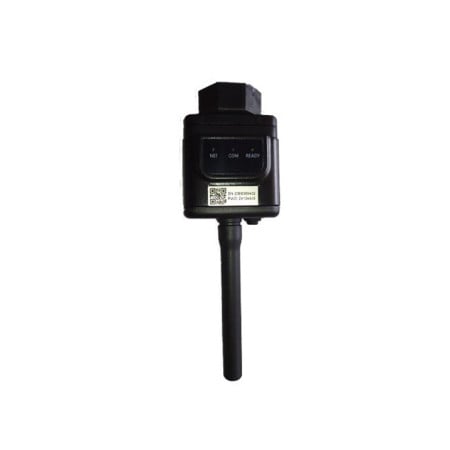

ZCS Azzurro USB Wi-Fi Kit ZSM-WIFI-USB
ZSM-WIFI-USB: Wi-Fi dongle for ZCS Azzurro inverters with a USB slot (single-phase Lite 1PH TLM-V3, hybrid and three-phase 3PH KTL-V3). The most affordable way to get your plant onto the monitoring app.
It plugs into the dedicated slot on the inverter body, is powered by the inverter and is configured from a dedicated web page. ZCS Azzurro app and portal included, no subscription.
Check before ordering: if your inverter has the circular RS232 connector you need the ZSM-WIFI-EXT model instead.
The ZSM-WIFI-USB is the ZCS Azzurro Wi-Fi stick for inverters fitted with a USB port. It plugs into the dedicated slot on the inverter body and connects the system to your home Wi-Fi: from then on production, consumption, battery status and alarms are visible in the ZCS Azzurro app and web portal, with no subscription.
Before ordering: does your inverter have a USB or an RS232 port?
This is the check that avoids a return. The USB version plugs into the USB slot on the underside of the inverter, the EXT version screws onto the RS232 port (circular connector). The two fittings are mechanically different and not interchangeable. Single-phase 1PH 3000/3680/4000/4600/5000/6000-TLM-V3 and three-phase 3PH 3.3/4.4/5.5KTL-V3 inverters typically use the USB slot.
| USB port + Wi-Fi connection | ZSM-WIFI-USB (this product) |
| RS232 port + Wi-Fi connection | ZSM-WIFI-EXT |
| USB port + network cable | ZSM-ETH-USB |
| RS232 port + network cable | ZSM-ETH-EXT |
| No internet available on site | ZSM-4G-USB (SIM included) |
| Plant with 2 or more inverters | ZSM-DATALOG-04 |
ZSM-WIFI-USB technical specifications
| Part number | ZSM-WIFI-USB |
| Type | Wi-Fi adapter with USB fitting |
| Installation | On the inverter body, dedicated slot |
| Inverter communication | RS232/USB |
| Internet connection | 2.4 GHz Wi-Fi to the home router |
| Connectable inverters | 1 |
| Power supply | Internal, from the inverter |
| Compatibility | 1PH 3000-6000-TLM-V3, hybrids, 3PH 3.3/4.4/5.5KTL-V3 and other Azzurro models with USB slot |
| Configuration | Dedicated WebServer page |
| Monitoring | ZCS Azzurro app (iOS/Android) and web portal, no subscription |
What you actually see every day
Monitoring is not a technical luxury: it is how you notice something is wrong before months go by. With this dongle you see in real time how much the panels are producing, how much the house is using and how much is being exported to the grid. Data updates automatically and is stored as daily, monthly and yearly history.
The most common real case: a 6 kWp system suddenly producing 30% less than the same month last year. Without monitoring you find out from the electricity bill, months later. With the app and alarm notifications you see it the same day and call the installer while the problem is still small.
Frequently asked questions
Is my ZCS inverter compatible with the ZSM-WIFI-USB?
Yes, if there is a dedicated USB slot on the underside of the inverter: this is the case for single-phase 1PH 3000/3680/4000/4600/5000/6000-TLM-V3, hybrid models and three-phase 3PH 3.3/4.4/5.5KTL-V3. If you find a circular screw connector instead, your inverter uses the RS232 port and you need the ZSM-WIFI-EXT.
How is the Wi-Fi connection configured?
Plug the dongle into the USB slot, connect to the Wi-Fi network it broadcasts and open the dedicated WebServer page, where you select your home network and enter the password. Then register the plant in the ZCS Azzurro app using the dongle serial number. The whole procedure takes a few minutes.
Why can't I find my Wi-Fi network during setup?
Almost always because the network is 5 GHz: the dongle only works on the 2.4 GHz band. If your router uses the same name for both bands, create a separate 2.4 GHz SSID or temporarily disable the 5 GHz one. Also check that the network runs WPA2 and that the signal reaches the inverter with decent strength.
Does monitoring keep working at night?
No: the dongle is powered by the inverter, so it switches off when the inverter goes into stand-by after sunset. The day production stays stored on the portal, but night-time consumption is not logged. For continuous 24-hour monitoring you need a datalogger with its own power supply, such as the ZSM-DATALOG-04.
Can I also see household consumption, not just production?
Only if a meter is installed with the system, such as the three-phase DTSU or the single-phase DDSU. Without a meter the portal shows PV production and, on hybrids, battery status; with a meter fitted you also get self-consumption, grid import and exported energy.