


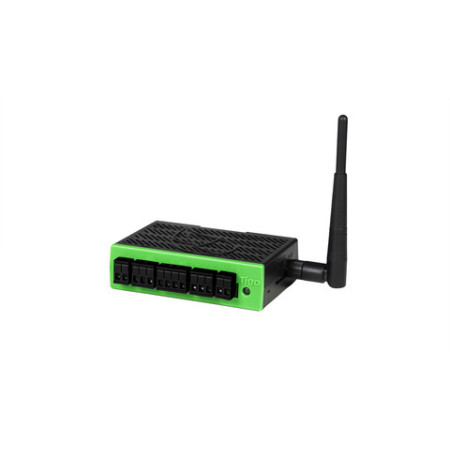

Tigo CCA Kit with TAP and DIN Rail Power Supply
Tigo Cloud Connect Advanced communication kit: includes the CCA data logger, the TAP (Tigo Access Point) and the DIN rail power supply. It is the hub that enables module-level monitoring and shutdown on TS4 optimizers.
Handles up to 900 TS4 devices and 7 TAPs, with internet connectivity over Ethernet or Wi-Fi and data on the Tigo Energy Intelligence platform.
The Tigo CCA (Cloud Connect Advanced) kit is the communication package that turns an array fitted with Tigo optimizers into a system monitored module by module. It contains the CCA data logger, the TAP that talks wirelessly to TS4 devices, and the DIN rail power supply — everything needed to commission a residential or commercial installation.
What the CCA does on site
TS4 optimizers work on their own, but without a data logger their activity stays invisible: there is no way to tell which module is underperforming, or why. The CCA collects the wireless data from each device and publishes it on the Tigo Energy Intelligence platform, enabling pinpoint diagnosis — the soiled panel, the one shaded at 4 pm, the one with a damaged cell — instead of only the inverter's aggregated string figure. It is also the control unit that commands module-level shutdown.
CCA kit technical specifications
| Kit contents | CCA + TAP + DIN rail power supply |
| TS4 devices supported | Up to 900 |
| TAPs supported | Up to 7 |
| Internet connectivity | Ethernet, Wi-Fi or cellular |
| TAP to CCA link | Cat5 / RS-485 cable |
| Third-party protocols | Modbus (inverters, meters, batteries) |
| Operating temperature | -20 °C to +70 °C |
| Mounting | DIN rail, inside enclosure |
| Platform | Tigo Energy Intelligence (app and web portal) |
| Compatibility | Tigo TS4-O, TS4-M, TS4-S devices |
How it is installed
- The CCA is mounted on DIN rail inside the enclosure and powered by the supply included.
- The TAP is placed in the middle of the array, on a module frame, and linked to the CCA with Cat5/RS-485 cable rated for outdoor use and UV resistant.
- The CCA connects to the site router over Ethernet cable or Wi-Fi.
- Commissioning is done from the Tigo app with the discovery routine, which maps the devices present in the field.
On larger arrays, or where the wireless distance between TAP and optimizers is excessive, further TAPs are added up to a maximum of seven per CCA.
Frequently asked questions
What exactly does the TG-CCAKIT1 include?
The kit comprises the Cloud Connect Advanced data logger, one TAP (Tigo Access Point) and the DIN rail power supply. The Cat5/RS-485 cable between TAP and CCA, and any outdoor enclosure, are not included and must be allowed for at design stage.
How many optimizers can a single CCA manage?
Up to 900 TS4 devices and up to 7 TAPs. For the vast majority of residential and commercial arrays one CCA with one TAP is more than enough; a second TAP is typically needed when the array is split across distant roof planes or buildings.
Is the kit mandatory if I already have TS4 optimizers?
Not for yield optimization alone, which works without communication. It becomes necessary if you want per-module monitoring on the Tigo portal, or the module-level shutdown function, which requires a TAP and a control unit.
Can other brands of inverter or meter be connected to the CCA?
Yes, the CCA communicates with third-party devices over Modbus, so it can also collect data from compatible inverters, energy meters and batteries, bringing generation and consumption together in one interface.
If I add panels later, does the configuration have to be redone?
The discovery routine is run only once. If the number of modules, TAPs or CCAs later changes, or the CCA is moved to a different site, the routine has to be reset by contacting Tigo support.