
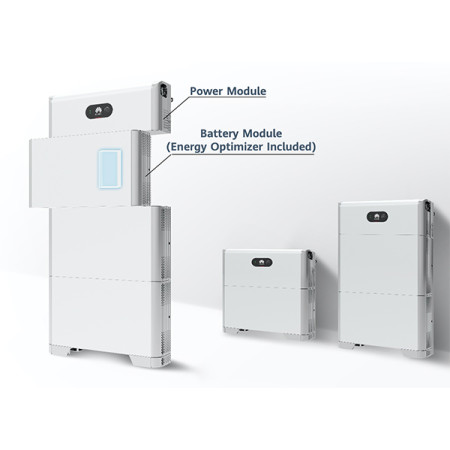

BMS LUNA2000
The BMS (Battery Management System) is a fundamental component for storage systems based on LUNA2000 series lithium batteries: it controls and balances charging/discharging, protects against overcharging/over-discharging, and helps to extend the battery pack's lifespan.
BMS Luna2000 – Accessory for Storage Systems
The performance of a system doesn't depend solely on panels or inverters: cabling, accessories, and protections are what hold everything together. Here we discuss an element that makes the rest of the system "work well."
BMS Luna2000 is an accessory for storage systems designed for photovoltaic storage and lithium batteries. The goal is simple: to improve compatibility, order, and reliability of the system, avoiding makeshift solutions that over time become a cost (and often a risk).
BMS -LUNA 2000-5KW-C0 Power module - dimensions 670x150x240 - 12 kg
What it does (and why it benefits you)
This accessory for storage systems is designed to integrate coherently with your configuration. The point is not to add complexity, but to simplify what you already have.
Main Advantages
- Promotes a clean electrical connection between storage modules, reducing voltage drops due to makeshift paths
- Helps prevent typical errors from "field adaptation" (cuts, makeshift joints, suboptimal tightening)
- It's a sensible choice if you want to optimize installation times and reduce system downtime
- Contributes to a more stable system management, especially when components need to communicate with each other
- Improves cabling order and facilitates future interventions (maintenance, upgrades, replacements)
- Supports reliable communication between battery and system (when provided by the series/model)
- Reduces the risk of incompatibility thanks to connectors and specifications consistent with the reference series
- Helps keep connections between battery, inverter, and any additional modules organized
Compatibility and Usage Scenarios
Before purchasing, always check: exact model (series and size), type of connector, available lengths, and intended use (e.g., connection between modules, connection to inverter or monitoring accessories).
If product names include codes (e.g., T58, X3-FTH, DTSU/DDSU, etc.), use them as an "anchor" to check compatibility: in these systems, a wrong code can mean a different pinout or protocol, even if it looks the same.
Details and Recommended Configuration
This product is designed to improve system integration and reliability. The value lies in consistency: compatible components and clean installation.
Checklist Before Purchase
- Compatibility
- Intended Use
- Installation
- Support
Installation, Safety, and Best Practices
For everything related to electrical connections, storage, and network interface, rely on qualified personnel and refer to the applicable standards for your case (e.g., CEI rules for network connection, protections, and commissioning). This approach is not "bureaucracy": it's safety, reliability, and fewer problems later.
Practical advice: photograph the current configuration before intervening, label the cables, and leave a little "slack" for future maintenance. The system will thank you, and so will you in two years.
FAQ
Is an installer needed?
For components that interact with the electrical network, batteries, or protections, a qualified installer is strongly recommended. Besides safety, you ensure compliance with applicable standards and correct commissioning.
Is it compatible with my system?
Compatibility depends on the model and configuration. Always check series, codes, and manufacturer specifications (inverter, battery, or wallbox) and, in case of doubt, compare photos/connectors or seek technical support before purchasing.
What is the difference between original and compatible accessories?
Originals are designed to work with the manufacturer's connectors, firmware, and tolerances. Compatible ones may work, but require extra checks on pinout, protocols, and warranties.
How do I choose the right length or version?
Evaluate the actual cabling path, bend radii, space in the panel, and margin for maintenance. A tidy passage is better than a cable stretched "to the millimeter."
In conclusion: If you are optimizing (or repairing) a system, this is one of those components worth choosing well: compatibility first, then performance.