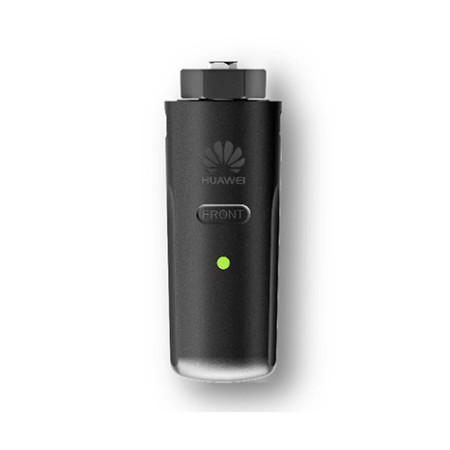

Huawei 4G Smart Dongle for SUN2000 Inverter
The Huawei 4G Smart Dongle connects SUN2000 inverters to the mobile network for real-time remote monitoring even without Wi-Fi, via a data SIM. Plug & Play, compatible with the FusionSolar app, IP65 rated, supports up to 10 inverters.
The Huawei 4G Smart Dongle is the communication module that connects Huawei SUN2000 photovoltaic inverters to the 4G mobile network, enabling real-time monitoring and management of the system even where no Wi-Fi connection is available. Simply insert a data SIM into the dongle.
When do you need the 4G Smart Dongle?
It is the ideal solution when the inverter is installed in a spot without Wi-Fi coverage — garages, cellars, ground-mounted systems, rural areas. With the data SIM inserted, the dongle sends production and consumption data to the FusionSolar cloud, allowing app control without depending on the home network.
Technical specifications
| Manufacturer | Huawei |
| Type | 4G communication module (Plug & Play) |
| Connectivity | 2G / 3G / 4G, WLAN |
| Interface | USB |
| Supported inverters | Up to 10 units |
| Protection rating | IP65 |
| Platform | Huawei FusionSolar |
| Compatibility | Huawei SUN2000 inverters |
Frequently asked questions
Is the SIM included?
Usually the data SIM is not included: you need to insert a SIM with a data plan suitable for monitoring. Check the conditions at the time of purchase.
Which inverters is it compatible with?
The 4G Smart Dongle is compatible with Huawei SUN2000 inverters. One dongle can manage the connection of up to 10 inverters in cascade (depending on the configuration).
What is the difference from the WLAN Smart Dongle?
The 4G Smart Dongle uses the mobile network (data SIM), ideal where there is no Wi-Fi. The WLAN Smart Dongle uses the local network's Wi-Fi or Ethernet. Choose according to the connectivity available at the installation point.
Is it difficult to install?
No, it is Plug & Play: it plugs into the inverter's communication port. Configuration is done through the FusionSolar app. Access to the inverter is still best handled by the installer.